
Image Optimization
Complete image optimization toolkit with AI-powered enhancements, compression, and SEO tools.
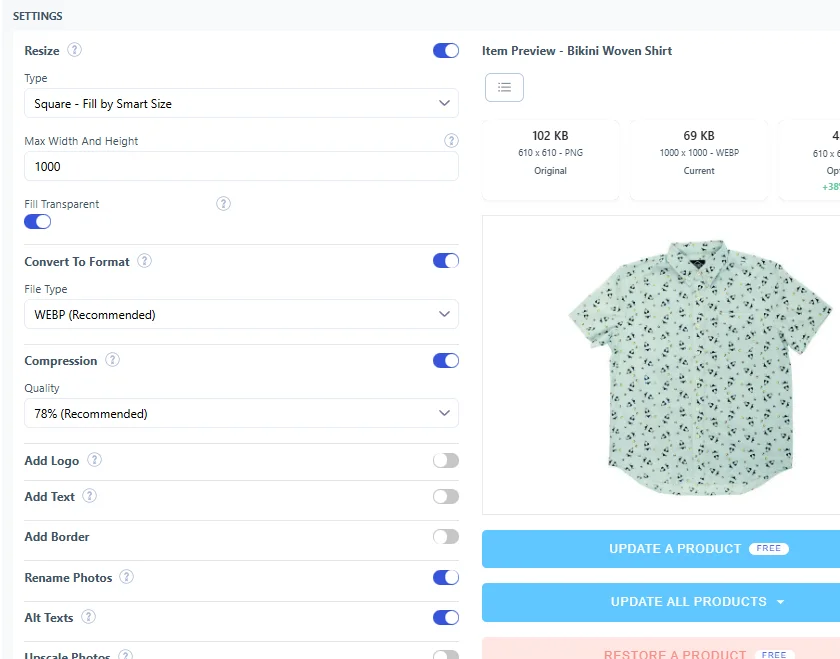
Smart Compression. Convert between JPG, PNG, and WebP formats with up to 80% file size reduction.
AI-Powered SEO. Auto-generate descriptive alt text and optimize filenames with Vision AI.
AI Upscaling. Enhance low-resolution images automatically for sharp, professional quality.
Background Removal. Isolate product subjects with AI-powered background detection.
Brand Watermarking. Protect product images with customizable watermarks and logos.
Why Image Optimization Matters
Drive better SEO rankings and conversions.
Page Speed
Images load 40-60% faster
More Sales
Fast images boost sales rates
Better SEO
Alt text drives search rankings
Mobile-Friendly
Optimized for mobile devices
How It Works
A streamlined workflow to perfect your product images.
Set Preferences
Test Single Product
Review & Refine
Process in Bulk
Filename & Alt Text Optimization
SEO-friendly filenames and AI-generated alt text improve search visibility and accessibility.
Filename Templates
- Product name integration
- Custom patterns
- Variable placeholders
Vision AI Alt Text
- AI captions
- Keyword extraction
- Bulk generation
Customization
- Manual editing
- Keyword blocking
- Max keywords
Compression & Formats
Smart compression and format conversion to reduce file sizes while maintaining visual quality.
Format Conversion
- WebP
- JPG
- PNG
Quality Control
- Adjustable compression
- Dimension limits
- File size tracking
Dimension Control
- Maximum width/height
- Aspect ratio lock
- Auto-resize images
AI Enhancement & Processing
Intelligent image processing with AI-powered upscaling, background removal, watermarking, and advanced editing.
AI Upscaling
- Low-res detection
- 2x/4x enhancement
- Bulk processing
Background Removal
- AI-powered isolation
- Transparent PNG
- Custom backgrounds
Watermarking
- Custom logos
- 9 position options
- Opacity control
Cropping & Resizing
- Smart cropping
- Aspect ratios
- Thumbnail generation
Image Management & Organization
Organize, manage, and optimize your image library with powerful bulk operations and theme support.
Bulk Operations
- Process thousands
- Queue management
- Progress tracking
Theme Images
- Theme optimization
- Asset folders
- CDN integration
Product Image Types
- Main products
- Variant images
- Collection banners
Backup & Restore
- Original files saved
- One-click restore
- Safe reprocessing
Best Practices
Get the most from image optimization by following proven strategies.
-
Test compression levels first
Process a few sample images before bulk operations to find optimal quality
-
Use SEO-friendly filenames
Include product names and descriptive keywords in image filenames
-
Keep watermarks subtle
Balance brand protection with user experience - avoid obtrusive watermarks
-
Prioritize product photos
Focus compression efforts on product images first, then theme images
-
Schedule regular optimization
Run bulk optimization monthly for new products added to your catalog
-
Enable auto-optimization for new uploads
Set rules to automatically optimize images as they're added to your store
-
Over-compress product photos
Excessive compression creates blurry images that hurt conversions
-
Skip backup verification
Always confirm backups are created before processing large batches
-
Use watermarks on Google Shopping
Google Shopping rejects watermarked images - submit clean versions
-
Ignore image dimensions
Images below 800px may appear pixelated - use AI upscaling when needed
-
Rename files without redirects
Always enable automatic redirects when changing filenames to avoid broken links
-
Forget about mobile optimization
Mobile users need even smaller file sizes - test on actual devices