
SEO Health & Performance
Monitor performance metrics, detect technical issues, and maintain optimal site health with comprehensive scanning and real-time diagnostics.
Performance Monitoring. Track loading times, JavaScript errors, and Core Web Vitals in real-time.
Comprehensive Scanning. Analyze 200+ data points across products, collections, and pages.
Issue Detection. Identify and categorize SEO problems with color-coded severity indicators.
Why Technical Monitoring Matters
Proactive monitoring catches problems before they impact traffic.
Speed Impact
Loading speed and errors directly affect rankings
Early Detection
Catch technical issues before they impact traffic
Core Web Vitals
Monitor Core Web Vitals as critical rank signals
Script Control
Control third-party scripts that bloat page weight
How Technical Analysis Works
Automated scanning and monitoring provide continuous insight into your store's technical health.
Configure Scans
Run Analysis
Detect Issues
Review Dashboard
Fix & Optimize
Track Progress
Performance Dashboard
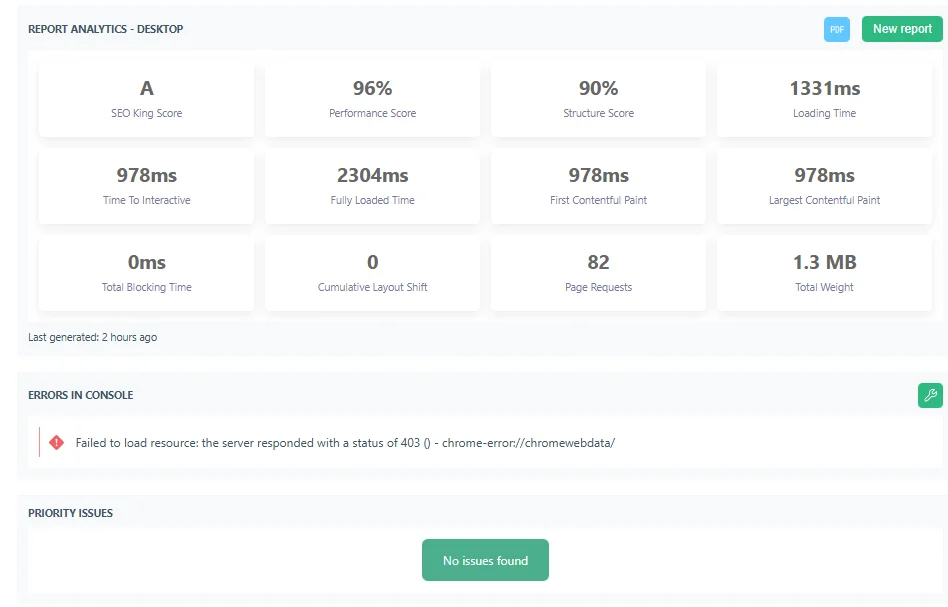
Real-time technical performance analysis with detailed loading metrics, JavaScript monitoring, and third-party app management.
Performance Metrics
- Time to Interactive (TTI)
- First Contentful Paint (FCP)
- Structure score & page weight
JavaScript Monitoring
- Error console detection
- Layout shift measurement (CLS)
- Unused JavaScript tracking
App & Script Control
- Third-party app embed toggles
- Theme.liquid script controls
- App performance monitoring
SEO Checklist
Prioritized optimization tasks with progress tracking and direct links to SEO King tools for efficient issue resolution.
Checklist Templates
- Initial setup checklist
- Monthly optimization tasks
- Technical SEO requirements
Task Management
- Custom checklist creation
- Task completion tracking
- One-time setup tasks
Progress Monitoring
- Progress tracking dashboard
- Seasonal review checklists
- Advanced optimization steps
Site Scanning
Automated scanning across all content types with real-time metrics, optimization tracking, and detailed analytics.
Content Type Scanning
- Products, Collections, Articles
- Pages & theme assets
- Include unpublished items
Optimization Tracking
- Meta titles & descriptions
- Alt texts & photo filenames
- URL structure & HTML
Analytics & Metrics
- File size analytics
- Image optimization metrics
- Real-time scan duration
Issue Detection
Systematic identification and categorization of SEO problems with color-coded severity and prioritized resolution tools.
Issue Categories
- Meta issues (titles, descriptions)
- Photo problems (missing, quality)
- HTML & accessibility issues
Detection Features
- Color-coded severity indicators
- Up to 1000 issues tracked
- CSV export functionality
Common Issues Found
- Missing referring links
- Excluded from index
- Missing alt texts & labels
Best Practices
Follow these guidelines to maintain optimal site health and catch technical issues before they impact rankings.
-
Run monthly comprehensive scans
Enable auto-scan to catch issues early before they impact traffic
-
Monitor third-party apps
Disable unused app embeds that bloat page weight and slow performance
-
Track Core Web Vitals weekly
Monitor LCP, FID, and CLS metrics as they directly affect rankings
-
Export CSV reports regularly
Keep historical records to track improvements and identify patterns
-
Test on mobile devices
Run dashboard analysis on mobile view for accurate performance data
-
Ignore JavaScript errors
Console errors can break functionality and harm user experience
-
Delay fixing high-priority issues
Address critical problems within 48 hours to prevent ranking drops
-
Skip unpublished items in scans
Catch issues before content goes live by including draft items
-
Install apps without testing impact
Check dashboard after adding apps to monitor performance degradation
-
Overlook layout shift issues
CLS problems frustrate users and harm mobile search rankings