
SEO Editor
Your central command center for managing product, collection, article, and page SEO. Edit meta fields, generate AI content, track SEO scores, and publish across multiple languages—all from one powerful interface.
Unified Dashboard. Manage all content types from one central interface.
AI-Powered Content. Generate optimized meta titles, descriptions, and alt text instantly.
Real-Time SEO Scoring. Track optimization progress with live SEO quality scores.
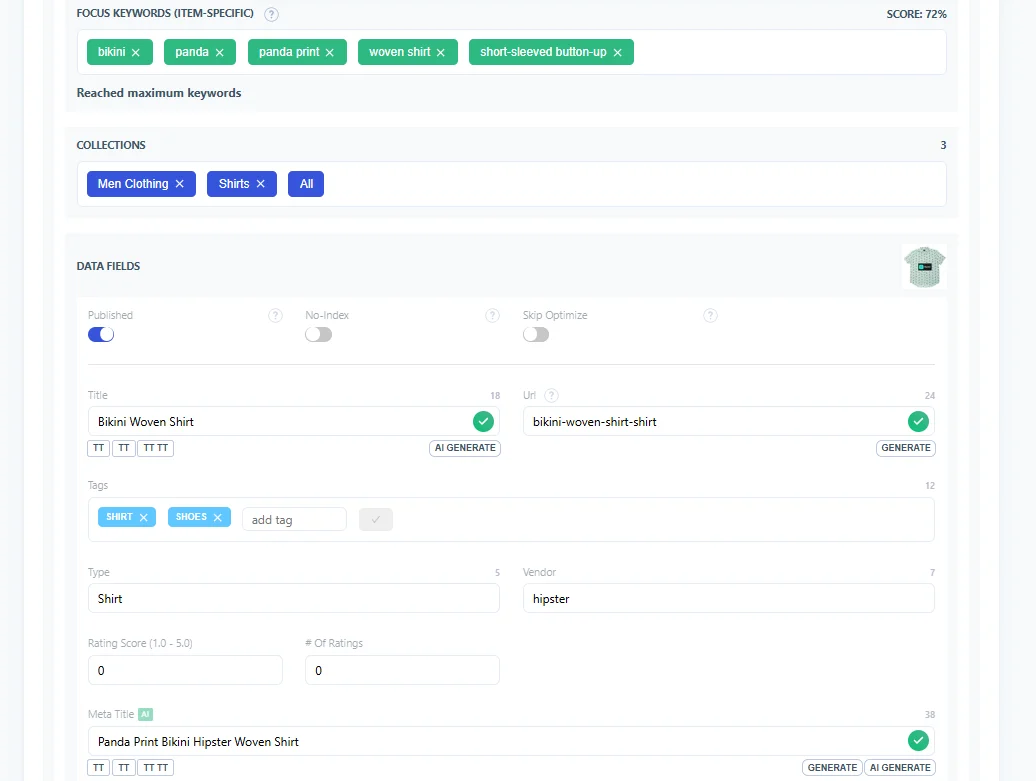
Why the SEO Editor Matters
Stop switching between multiple tools. The SEO Editor consolidates all your content optimization needs into one streamlined workspace.
Save Time
Edit hundreds of products in minutes instead of hours
Stay Consistent
Maintain uniform SEO quality across all content types
Track Progress
Monitor SEO scores and identify gaps at a glance
Go Global
Translate and optimize for international markets effortlessly
How It Works
A simple 4-step workflow to optimize your entire catalog with AI-powered content generation.
Select Content Type
Set Focus Keywords
Generate AI Content
Publish & Track Score
General Settings
Configure your SEO Editor with powerful AI controls and optimization toggles.
Publishing Controls
- Published Toggle
- 1N-I Indexing Toggle
- Skip Optimize Option
AI Configuration
- GPT Model Selection
- Creativity Levels
- Formality Settings
Content Limits
- HTML Max Characters
- Character Counters
- Auto-Truncation
Focus Keywords
- Keyword Targeting
- Bulk Keyword Updates
- Keyword Optimization
Analytics
- Track Analytics Toggle
- SEO Score Display
- Performance Tracking
Vision AI
- Vision AI Toggle
- Image Alt Text Generation
- Visual Content Analysis
Editor Interface Features
A comprehensive workspace designed for efficient bulk editing and content optimization.
Navigation Tabs
- Products Tab
- Collections Tab
- Articles & Pages Tabs
Editable Fields
- Title & URL Handle
- Meta Title & Description
- Tags & Categories
AI Generation
- One-Click AI Buttons
- Field-Level Generation
- Instant Preview
Quick Actions
- Admin Link
- Web Page Preview
- Google Search Console
Search Engine Access
- Google Search Link
- Bing Search Link
- DuckDuckGo & Brave Links
Page Settings
- Page Builder Toggle
- Navigation Options
- Custom Configuration
Best Practices for SEO Editor
Maximize efficiency and SEO impact with these expert tips for using the SEO Editor effectively.
-
Set focus keywords first
Define target keywords before generating content for better optimization
-
Review AI-generated content
Always review and refine AI suggestions to match your brand voice
-
Track SEO scores regularly
Monitor improvement trends and identify underperforming content
-
Use bulk operations efficiently
Group similar products or categories for faster optimization
-
Translate after optimizing
Perfect your primary language content before batch translating
-
Skip SEO score review
Low scores indicate missing optimization opportunities
-
Use generic keywords
Specific, long-tail keywords drive more qualified traffic
-
Ignore character limits
Meta descriptions and titles that are too long get truncated in search
-
Duplicate content across products
Each product needs unique, tailored meta descriptions
-
Forget to save changes
Always publish updates after editing to apply changes to your store